Apple Watch 1.5-Mile Test: Hands-Free VO2 Max
Run the 1.5-mile VO2 max test hands-free on your Apple Watch: no stopwatch, no track math, just one number out. Here is the protocol I trust the most.
The 1.5-mile (2.4 km) timed run produces a VO2 max estimate within 2 to 3 mL/kg/min of the lab number when you pace it correctly. Running it from an Apple Watch removes the stopwatch, the measured-track requirement, and the manual formula, all in one. The trade-off is that you have to trust your pacing on a watch face the size of a postage stamp.
I have run this test on the Apple Watch Series 7, the SE, and the Ultra 2. The Ultra is the easiest because the always-on display saves you from waking the screen mid-effort, but every recent Apple Watch handles the protocol fine. What matters more than the model is how you set up the metric you watch during the effort: pace, not heart rate.
What does the 1.5-mile test actually measure?
The 1.5-mile run measures the fastest sustained pace your aerobic system can support over a 9 to 13 minute effort. That window matches the time-to-exhaustion zone that maps most cleanly onto VO2 max, which is why the test has stayed in military selection batteries for 60 years. You finish, you read your time, you plug it into a regression equation, you get a VO2 max number.
The most common formula is the one published by George, Vehrs, Allsen, Fellingham & Fisher in Medicine & Science in Sports & Exercise (1993). It looks like this: VO2 max (mL/kg/min) = 88.02 minus (0.1656 × body mass in kg) minus (2.76 × finish time in minutes) plus (3.716 × sex, where male = 1, female = 0). For a 71 kg male finishing in 10:00, that lands at 56.4 mL/kg/min. For an 80 kg male at 12:00, around 49.0 mL/kg/min.
The validation cohort in the original George paper covered 753 college-age subjects. The reported correlation with directly measured VO2 max was r = 0.86 with a standard error of estimate of 3.6 mL/kg/min. That last number is the one that matters in practice. Two consecutive 1.5-mile tests can land 3 mL/kg/min apart and the lab number behind them might not have moved at all. Plan your retests with that uncertainty in mind.
Why run the 1.5-mile test on the Apple Watch?
The watch handles three pieces of friction that used to cost me time and accuracy: the timing, the distance, and the formula. The wrist GPS measures the 1.5 miles for me, the haptic taps tell me when I have hit each split, and the workout summary at the end is a single screen with the time and the average pace.
Apple Watch GPS accuracy on an open route is around plus or minus 1.5 percent of the measured distance, based on the controlled testing reported by DC Rainmaker across the Series 8 and Ultra 2. That uncertainty translates to roughly 5 to 8 seconds across a 1.5-mile effort. Your pacing variance will dwarf that error in almost every case, so do not lose sleep over the GPS.
The other reason to run this on the wrist is consistency. Track conditions vary, but my watch always uses the same algorithm and the same formula. That is the whole point of having a portable test you can repeat. If you want the comparison against the laboratory number and the wrist VO2 max estimate that Apple itself ships in the Health app, the breakdown of all field, lab, and wearable VO2 max methods covers what each one is and is not telling you.
What is the protocol I use?
Three steps. Warm up for 8 to 10 minutes with easy running and 4 by 30-second strides. Start an Outdoor Run on the Apple Watch and run 1.5 miles flat-out. Stop the workout the moment the watch announces the distance and read the time. That is it.
Two settings are worth setting up before your first run. First, configure the Workout View so the metric in the largest tile is current pace, not heart rate. You want to manage effort against pace because the heart-rate signal lags 30 to 60 seconds behind reality on the wrist optical sensor, and that lag is the difference between a good test and a blow-up at 1.2 miles. Second, turn on Auto-Pause off. You do not want the watch deciding for you when a slow patch counts.
If you are going to run this test more than twice, save the workout view as a custom layout so you do not lose those settings to a watchOS update. The Outdoor Run profile resets layout preferences sometimes when iOS pushes a major release, and a forgotten heart-rate-as-primary tile has cost me at least one bad test.
How accurate is the wrist-based estimate?
Within 3 mL/kg/min of a lab gas-exchange test, in my experience, when the run is well paced. That is consistent with the standard error of the George 1993 formula and with reports from coaches who have published Apple Watch vs treadmill VO2 max comparisons. The error climbs sharply if you positive-split the run, finish with energy left, or run on a hilly course.
Note that the VO2 max number Apple shows in the Health app under Cardio Fitness is a different beast. It is computed from your routine outdoor walking and running data using a regression Apple developed with Stanford and the Apple Heart and Movement Study, not from the 1.5-mile test you just ran. The two numbers should be in the same neighborhood, but expect the Cardio Fitness estimate to lag your fresh test by 3 to 6 weeks because it is averaged over rolling data.
What pacing strategy works best?
Even-pace it. Aim for the same pace you can hold for 9 to 13 minutes with everything you have, then run that pace from the gun. The temptation to bank time in the first 800 meters is the single biggest reason 1.5-mile tests come back under-cooked. Holders of strong VO2 max numbers like Eliud Kipchoge run their hard efforts at the most boringly even pace you have ever seen, and there is a reason for that.
If you do not know your goal pace, run a Cooper test first. The 12-minute distance gives you a defensible target pace for the 1.5-mile attempt a week later. The same logic works in reverse: if your 1.5-mile result feels off, validate it with the Cooper version on the Apple Watch, the Balke version, or the Yoyo version. Three tests on the same watch, three estimates, and you can spot the outlier.
When should you re-test?
Every 4 to 6 weeks during a training block, never in the same week as a hard interval session, and never the day after a long run. Trained VO2 max moves about 0.5 to 1.0 mL/kg/min per month at most, so testing weekly mostly captures pacing noise.
If you suspect your numbers are not real and you cannot work out why, the checklist for inconsistent VO2 max readings covers the usual suspects: temperature swings, sleep deprivation, dehydration, and bad pacing. Most test-to-test variance comes from those four, not from your fitness changing.
Frequently asked questions
Can I run the 1.5-mile test on a treadmill? Yes, with two caveats. Set the incline to 1 percent to compensate for the missing wind resistance, and run a calibration loop outdoors first so the watch knows your treadmill stride.
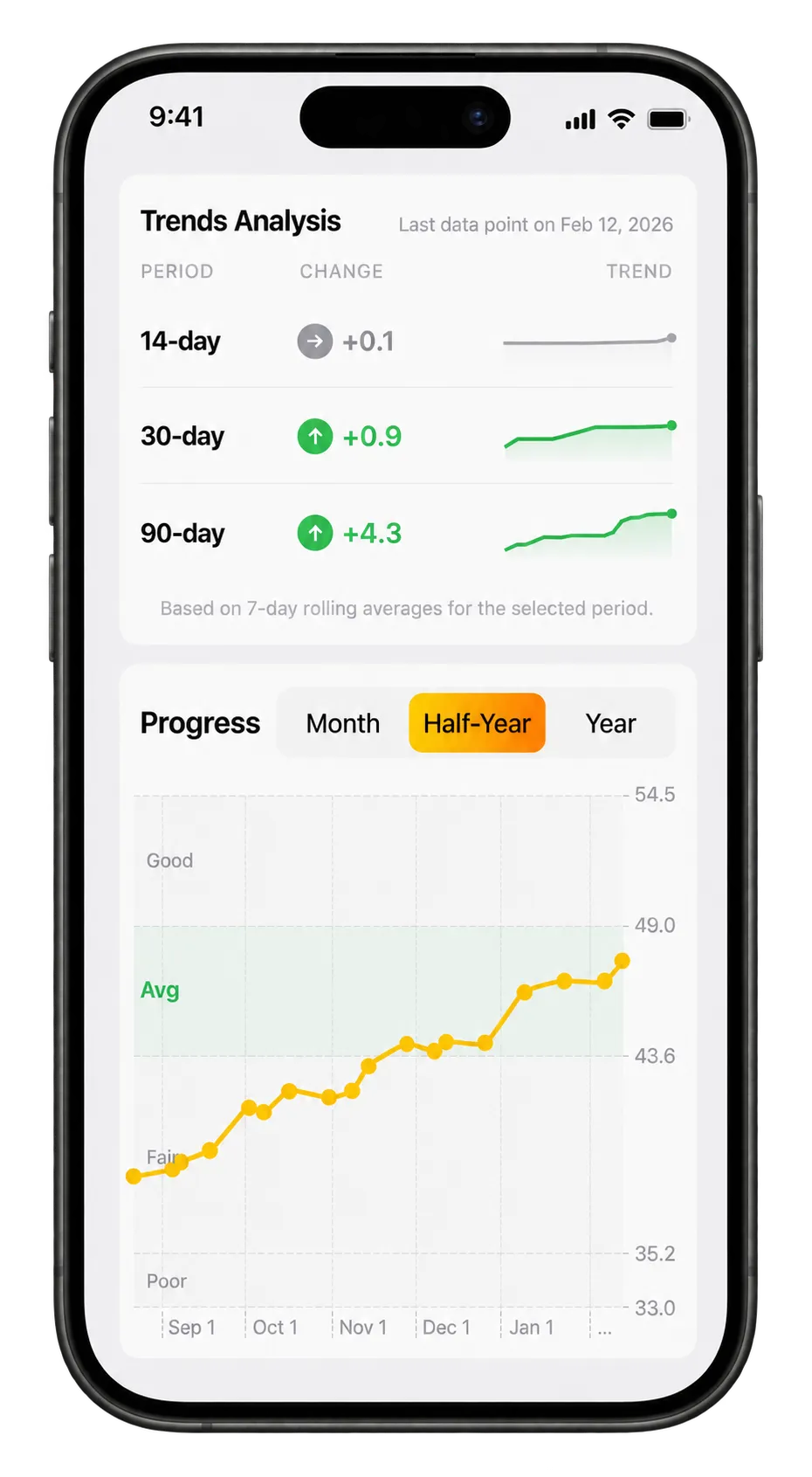 Vo2 Max progression tracking directly in the iPhone app.
Does the Apple Watch correct for altitude? No. At anything above 1,500 meters elevation you should subtract 3 to 5 percent from your aerobic effort budget, and your test result will reflect that. Run at the same elevation if you want comparable trends.
Is the 1.5-mile test better than the beep test on the wrist? Different tests measure different things. The beep test punishes acceleration and deceleration, the 1.5-mile run punishes pacing. If your sport is intermittent, run the Yoyo. If your sport is steady, run the 1.5-mile or the Cooper.
Want to run the 1.5-mile test without thinking about formulas, splits, or which workout view to set up? Vo2 Maximizer handles the audio cues, watches your pace in real time, applies the George 1993 regression for you, and saves the result next to your Cooper, Balke, Yoyo, and beep test history so you can spot the trend across tests.